
Picking Content Hub products in the SitecoreAI Page builder: a Marketplace custom field


A request I hear a lot on SitecoreAI projects goes like this: “We have a Featured products component on the homepage and on campaign pages. The products, their names, SKUs, copy and images all live in Content Hub. Can our authors just pick them?”
I recently built exactly that for a customer project, and it worked well enough that I want to share the approach. The result is Content Hub Picker, a SitecoreAI Marketplace custom field app. An author clicks Open app on a field in the Page builder, searches and filters Content Hub products, picks a few, puts them in order and saves. The page stores only the ids. Everything else is read live from Content Hub.
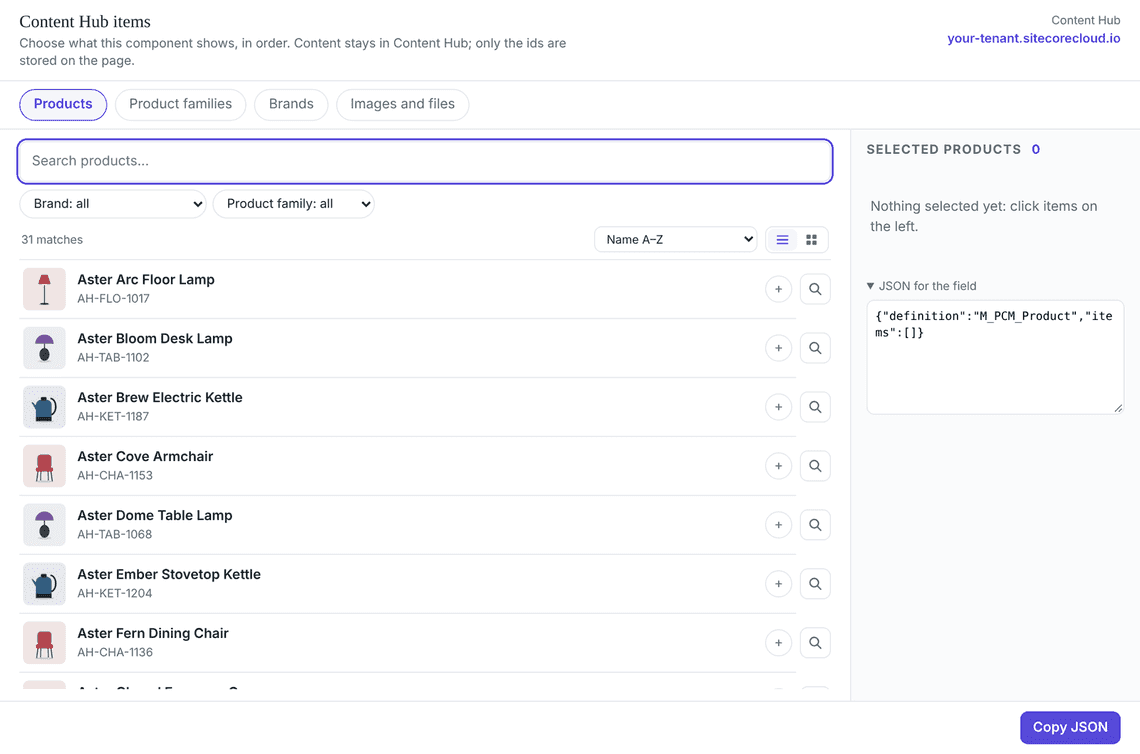
Screenshots in this article use a demo catalogue with made-up brands and products, not customer data.
The use case: a component whose content lives in the PIM
A Featured products component looks simple: a heading, a line of copy and three or four product cards. The cards are the hard part. Each one needs a product name, a SKU, a short description and an image, and in this kind of setup all of that is already managed in Content Hub PIM (M.PCM.Product, with brands, product families and master assets in the DAM).
The usual workarounds all have a cost:
- Copy the product data into Sitecore items. Quick to start, but now there are two copies. A product renamed or re-shot in Content Hub is out of date on the website until someone notices.
- Ask authors to paste ids. No duplication, but nobody wants to hunt for entity ids, and mistakes only show up on the published page.
- Build a sync job. It works, but it is another moving part to run and monitor, just to let an editor choose four products.
What the authors actually needed was a picker in the place where they already build the page, with the same search and filtering they expect from Content Hub, and with the content left where it belongs.
What the author sees
The field on the component’s datasource is a Marketplace Plugin field. In the Page builder it shows an Open app button, which opens the picker in a modal.
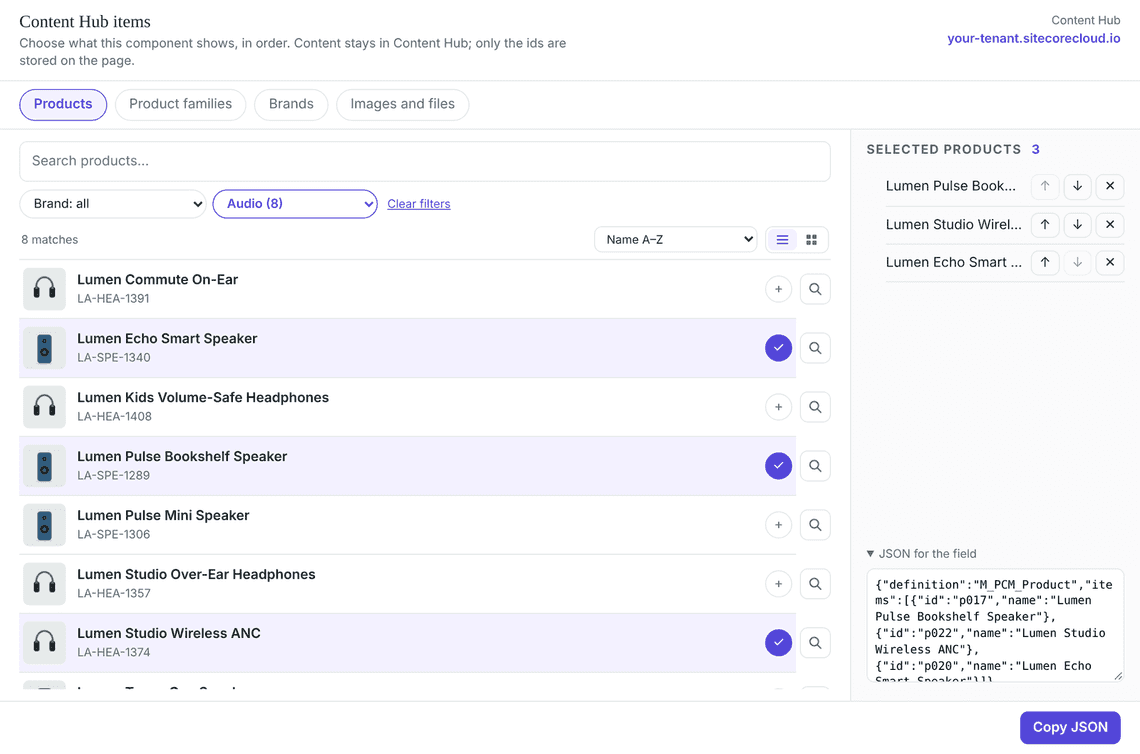
From there the author can:
- switch between Products, Product families, Brands and Images and files (any other type published to Experience Edge appears under Other types);
- search by name, SKU or description;
- filter by brand or product family, with live counts per value;
- pick items, then reorder them with ↑ ↓ in the Selected column, because the order on the page matters;
- switch to a grid when images matter more than names;
- open a large preview before deciding.
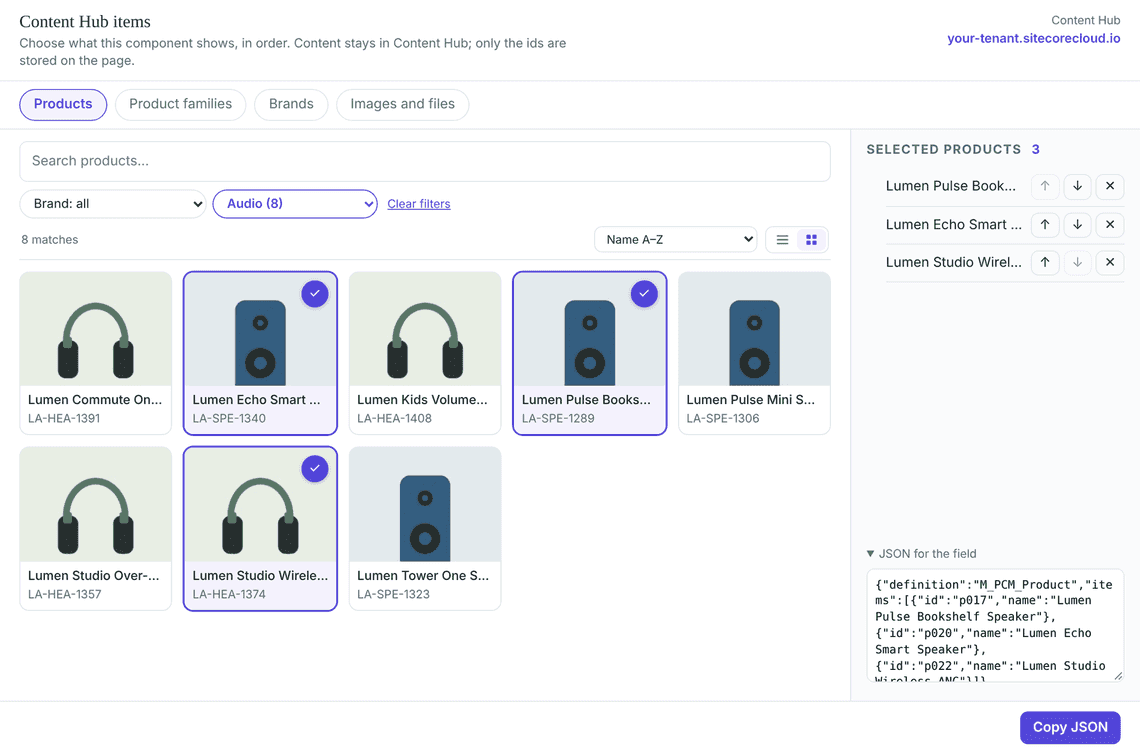
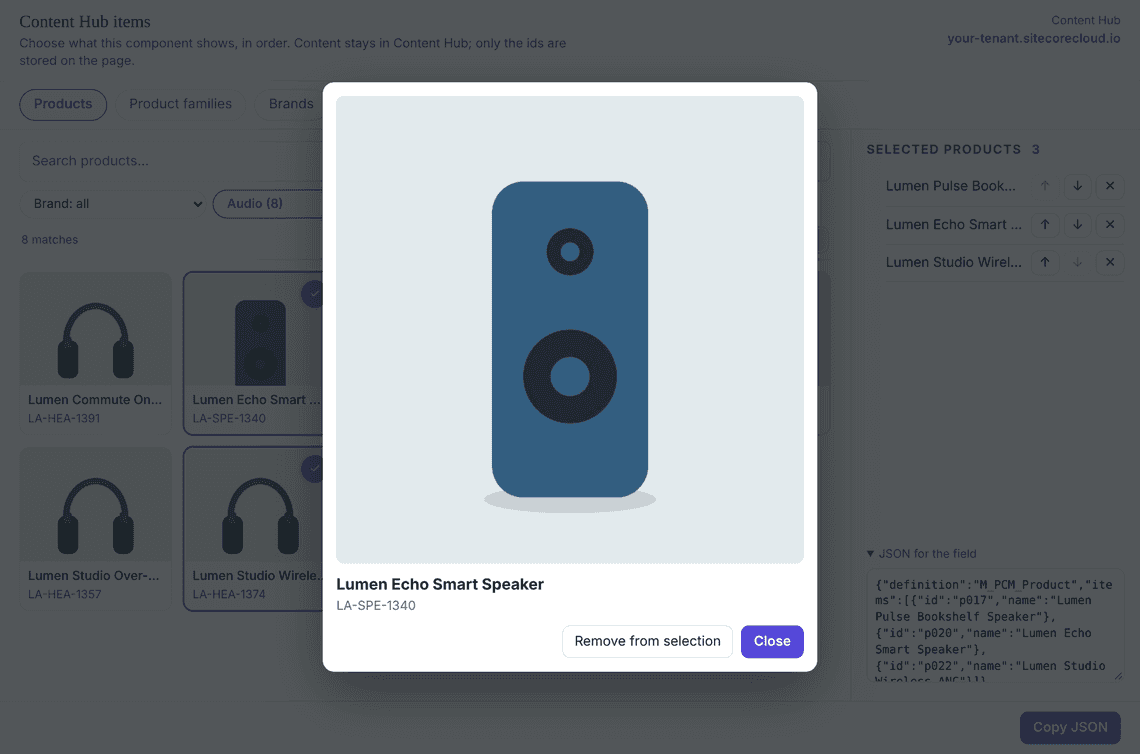
Save picks writes the value to the field and closes the modal. The component on the page then shows the chosen products, in that order.
Architecture
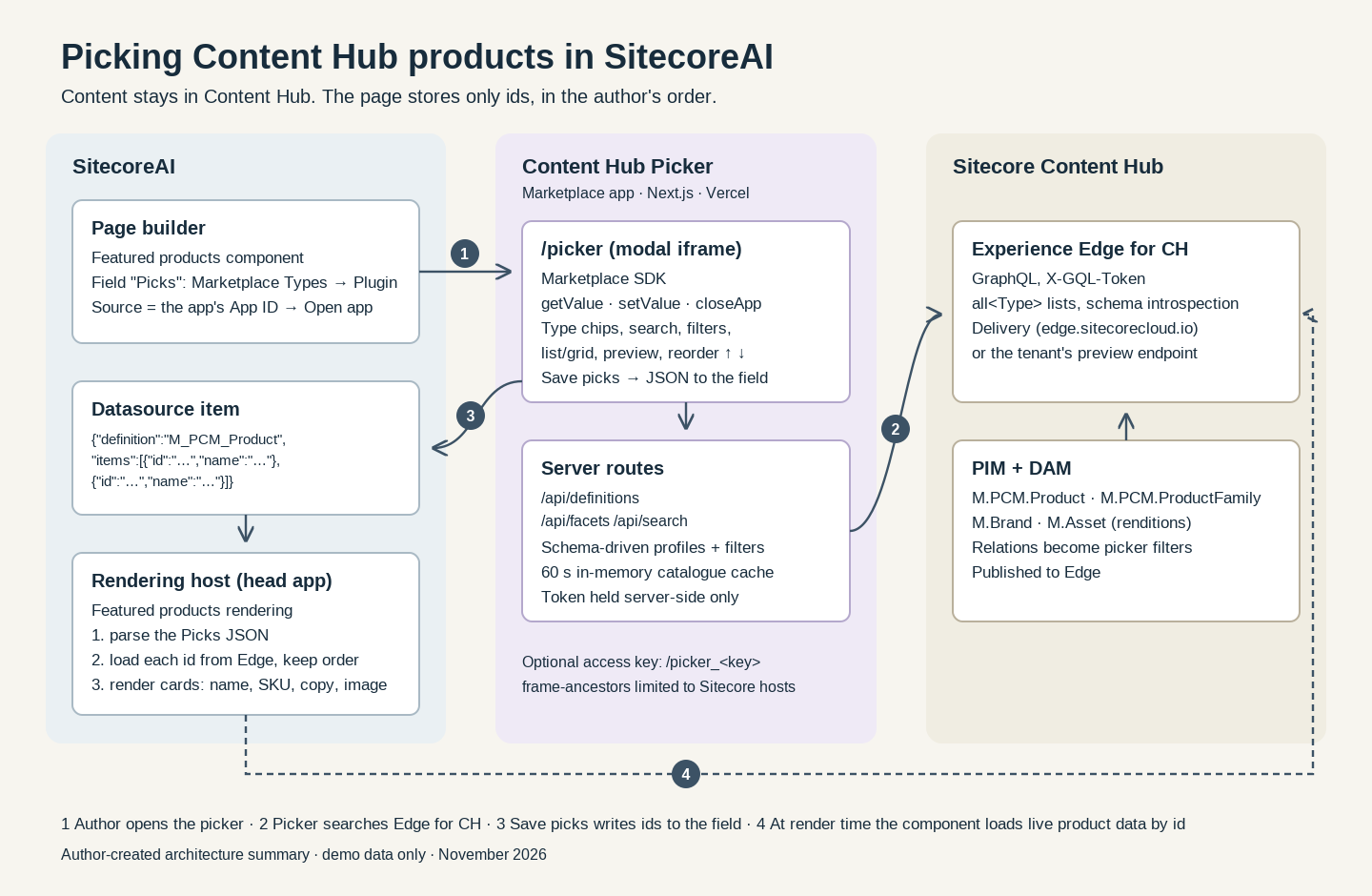
Author-created architecture summary, using demo data only.
There are three parts, and four steps:
- The author opens the picker. This is SitecoreAI’s Page builder custom field extension point. The Picks field is of type Marketplace Types → Plugin, with the app’s App ID as its source. SitecoreAI opens the app’s
/pickerroute in an iframe and the Marketplace SDK connects it to the field:getValueloads the current picks,setValuesaves the new ones andcloseAppcloses the modal (see get and set custom field values). - The picker searches Content Hub. The browser never talks to Content Hub directly. It calls the app’s own Next.js API routes (
/api/definitions,/api/facets,/api/search), and those call Experience Edge for Content Hub over GraphQL with the token held on the server. - Save picks writes ids to the field. The datasource item gets a small JSON value. Nothing else is copied.
- At render time, the component loads live data. The Featured products rendering reads the ids and loads each product from Experience Edge for Content Hub, keeping the author’s order.
Talking to the Page builder: the Marketplace SDK
The whole SitecoreAI integration is a few lines with @sitecore-marketplace-sdk/client. When the page loads inside the modal, the picker initialises the SDK against window.parent and reads the field’s current value; when the author clicks Save picks, it writes the new value and closes the modal. If there’s no parent window (or the handshake times out), it falls back to a standalone mode that builds the JSON for copying.
// components/PickerApp.tsx (trimmed)
import type { ClientSDK } from "@sitecore-marketplace-sdk/client";

// on load
if (window.parent === window) {
  setStandalone(true);                       // opened directly in a browser
} else {
  const { ClientSDK } = await import("@sitecore-marketplace-sdk/client");
  const client = await Promise.race([
    ClientSDK.init({ target: window.parent }),
    new Promise<never>((_, reject) => setTimeout(() => reject(new Error("timed out")), 8000)),
  ]);
  setClient(client);
  const current = parsePicks(await client.getValue());   // what's already in the field
  if (current) setSelected(current.items);
}

// on "Save picks"
const save = async () => {
  await client.setValue(serializePicks({ definition, items: selected, max }), true);
  await client.closeApp();
};
Installing it is a single package: npm install @sitecore-marketplace-sdk/client. The picker uses the SDK’s built-in authorization and never calls SitecoreAI APIs, so it doesn’t need the optional xmc package.
What gets stored on the page
The field value is deliberately small:
{
  "definition": "M_PCM_Product",
  "items": [
    { "id": "p017", "name": "Lumen Pulse Bookshelf Speaker" },
    { "id": "p020", "name": "Lumen Echo Smart Speaker" },
    { "id": "p022", "name": "Lumen Studio Wireless ANC" }
  ]
}
definitionis the Experience Edge type name (Content Hub’s dottedM.PCM.Productis accepted too).itemsis in the author’s order, with at most 24 entries.nameis only there so the raw value is readable in the Content Editor. Renderings never display it; they load the current data byid.
An optional max caps the selection. Setting the field’s standard value to {"definition":"M_Asset","max":1,"items":[]} turns the same app into a single-image picker for a hero or banner, and {"definition":"M_PCM_Product","items":[]} opens it straight on Products.
The parser on both sides is tolerant: it accepts a string or an object, drops malformed items and duplicates, and enforces the limits. A field that someone edited by hand will not break the page. It imports nothing, so the picker, its API and your rendering can share the same file:
// lib/picks.ts
export interface Pick { id: string; name: string }
export interface Picks { definition: string; items: Pick[]; max?: number }
export const MAX_PICKS = 24;

export const normalizeDefinition = (d: unknown) => String(d ?? "").trim().replace(/\./g, "_");

export function parsePicks(raw: unknown): Picks | null {
  let v: any = raw;
  if (typeof v === "string") {
    if (!v.trim()) return null;
    try { v = JSON.parse(v); } catch { return null; }
  }
  if (!v || typeof v !== "object") return null;
  const definition = normalizeDefinition(v.definition);
  if (!definition) return null;

  const seen = new Set<string>();
  const items: Pick[] = [];
  for (const it of Array.isArray(v.items) ? v.items : []) {
    const id = typeof it === "string" ? it.trim() : String(it?.id ?? "").trim();
    if (!id || seen.has(id)) continue;            // drop blanks and duplicates
    seen.add(id);
    items.push({ id, name: String(it?.name ?? "").trim().slice(0, 200) });
    if (items.length >= MAX_PICKS) break;
  }
  const max = Number(v.max);
  return Number.isInteger(max) && max >= 1 && max < MAX_PICKS
    ? { definition, items: items.slice(0, max), max }
    : { definition, items };
}
Under the hood
A few design decisions made the difference between a demo and something that held up on a real Content Hub tenant.
Profiles, not hard-coded fields. Every tenant’s schema is slightly different. The app has built-in profiles for the standard definitions (for a product: productName as the title, productNumber as the subtitle, the master asset as the image), and builds a profile automatically for any other type Experience Edge publishes by reading the schema: the first …Name or …Title field, a …Number or …Code as the subtitle, the master asset relation as the image. Fields the tenant lacks are dropped instead of failing the query.
// lib/profiles.ts: built-in profiles for the standard Content Hub definitions
const BUILTIN: Record<string, Partial<Profile>> = {
  M_PCM_Product: {
    label: "Product", labelPlural: "Products",
    title: ["productName", "productLabel"],
    subtitle: ["productNumber"],
    summary: ["productShortDescription"],
    image: ["pCMProductToMasterAsset", "pCMProductToAsset"],
  },
  M_PCM_ProductFamily: { label: "Product family", labelPlural: "Product families", title: ["productFamilyLabel", "productFamilyName"], image: ["pCMProductFamilyToMasterAsset"] },
  M_Brand:  { label: "Brand", labelPlural: "Brands", title: ["brandLabel", "brandName"], image: ["pCMBrandToMasterAsset"] },
  M_Asset:  { label: "Image or file", labelPlural: "Images and files", title: ["title", "fileName"], image: ["self"] },
  // …press releases, content items, collections
};
Discovering which types exist is a single introspection query against Experience Edge: every all<Type> list on Query is a candidate definition.
// lib/edge.ts
const data = await edgeRequest(`query { __type(name: "Query") { fields { name } } }`);
const types = data.__type.fields
  .map((f: { name: string }) => f.name)
  .filter((n: string) => /^all[A-Z]/.test(n))
  .map((n: string) => n.slice(3));            // allM_PCM_Product → M_PCM_Product
Filters come from relations. Relations from a definition to another published definition, such as brand or product family, become filters automatically. Only relations that some entity actually uses are kept. Filters combine with AND across filters and OR within one, and each value shows how many items match given everything else, so authors never filter themselves into an empty list.
One load, many searches. For a definition, the server loads the published entities once (100 per GraphQL page, up to 2,000) and keeps them in memory for 60 seconds. Search, filtering, counting, sorting and paging then run on that list, so typing in the search box doesn’t send a GraphQL request per keystroke.
// lib/edge.ts: page through all<Type> with Edge's cursor paging
export async function edgeAll(type: string, selection: string, max = 1000) {
  const out: any[] = [];
  let after: string | null = null;
  for (let page = 0; page < 50 && out.length < max; page++) {
    const data = await edgeRequest(
      `query($after: String) { list: all${type}(first: 100, after: $after) {
         pageInfo { hasNext endCursor } results { ${selection} } } }`,
      { after },
    );
    out.push(...(data.list?.results ?? []));
    if (!data.list?.pageInfo?.hasNext) break;
    after = data.list.pageInfo.endCursor;
  }
  return out.slice(0, max);
}
For products, the selection the catalogue builds looks like this. The image comes from the master asset’s urls (thumbnail for tiles, preview for the large view), and each filter is just the ids of a relation:
query($after: String) {
  list: allM_PCM_Product(first: 100, after: $after) {
    pageInfo { hasNext endCursor }
    results {
      id modifiedOn productName productNumber productShortDescription
      pCMProductToMasterAsset { results { id fileName urls } }
      brandToProduct { results { id } }
      pCMProductFamilyToProduct { results { id } }
    }
  }
}
The picker’s own API is plain JSON, which makes it easy to test with curl:
# Audio products, searched for "speaker", newest first
curl "https://<your-app>.vercel.app/api/search?definition=M_PCM_Product&q=speaker&sort=updated&f=%7B%22pCMProductFamilyToProduct%22%3A%5B%22f2%22%5D%7D"
{
  "definition": "M_PCM_Product", "label": "Products", "total": 4, "offset": 0,
  "counts": { "brandToProduct": { "b2": 4 }, "pCMProductFamilyToProduct": { "f2": 4 } },
  "items": [ { "id": "p018", "name": "Lumen Pulse Mini Speaker", "sub": "LA-SPE-1306", "image": "…", "large": "…" }, … ]
}
Either token works. The app tries the configured endpoint, then Edge Delivery, then the tenant’s preview endpoint, and remembers the first that answers. A Delivery key and a preview key both work without extra configuration, and a status page shows which endpoint is in use and the last error.
// lib/config.ts
export function edgeCandidates(): string[] {
  return [...new Set([
    config.edgeUrl,                                            // CH_EDGE_URL, if set
    "https://edge.sitecorecloud.io/api/graphql/v1",            // Edge Delivery
    config.chHost ? `${config.chHost}/api/graphql/preview/v1` : "", // the tenant's preview API
  ].filter(Boolean))];
}
One gotcha worth knowing: on a Content Hub sandbox, the Delivery base URL is edge-beta.sitecorecloud.io rather than edge.sitecorecloud.io, so set CH_EDGE_URL explicitly there. Every request sends the key in the X-GQL-Token header.
Locked down by default. The Content Hub token stays on the server. An optional access key can be required on the API, in which case the custom field route is registered as /picker_ followed by the key (App Studio routes allow a single path segment, so the app rewrites it). The app can only be framed by Sitecore hosts.
// next.config.ts
const nextConfig: NextConfig = {
  // Only the SitecoreAI Page builder may embed the picker
  async headers() {
    return [{
      source: "/:path*",
      headers: [{ key: "Content-Security-Policy",
                  value: "frame-ancestors 'self' https://*.sitecorecloud.io https://*.sitecore.cloud" }],
    }];
  },
  // App Studio routes allow one path segment and no query string,
  // so the optional access key travels in the route: /picker_<key> → /picker
  async rewrites() {
    return [{ source: "/picker_:key", destination: "/picker" }];
  },
};
// lib/access.ts: compare the key in constant time
export function denied(request: Request): NextResponse | null {
  const key = config.accessKey;
  if (!key) return null;                               // no key configured: open API
  const a = Buffer.from(request.headers.get("x-picker-key") || "");
  const b = Buffer.from(key);
  if (a.length === b.length && timingSafeEqual(a, b)) return null;
  return NextResponse.json({ error: "This picker needs its access key." }, { status: 401 });
}
Setting it up
The app is a standard Next.js App Router project deployed to Vercel, following the same setup as my other Marketplace apps:
-
Deploy with the Content Hub settings in the environment:
# .env.local (and the same values in Vercel)
CH_HOST=https://your-tenant.sitecorecloud.io
CH_EDGE_TOKEN=<Delivery or preview API key>      # sent as X-GQL-Token
CH_EDGE_URL=                                      # optional: the endpoint to try first
PICKER_ACCESS_KEY=                                # optional: 24+ letters, digits, _ or -
PICKER_ONLY_DEFINITIONS=M_PCM_Product,M_Brand,M_Asset   # optional allow-list
-
Register it in App Studio as a custom app with the Custom field extension point turned on, route
/picker, display name Content Hub items. It needs no SitecoreAI API access, because Content Hub is read through its own server routes. -
Install it into the organisation and environment, and copy the App ID.
-
Add the field to the component’s datasource template: a field named
Picks, type Marketplace Types → Plugin, source = the App ID. Give it a standard value such as{"definition":"M_PCM_Product","items":[]}so the picker opens on Products.
Opened outside SitecoreAI, the picker still works in the browser and Save picks becomes Copy JSON, which is handy for testing and for filling the field by hand.
Rendering the Featured products component
On the head side, the rendering only has to do three things: parse the field, load each product by id, and keep the order. A simplified sketch:
type Picks = { definition: string; items: { id: string; name: string }[] };

export async function FeaturedProducts({ fields }: { fields: { Picks: { value: string } } }) {
  const picks: Picks | null = safeParse(fields.Picks?.value);
  if (!picks?.items.length) return null;

  // fetchProducts queries Experience Edge for Content Hub for these ids
  // (server-side, with your Delivery token) and returns name, SKU, copy and image.
  const byId = await fetchProducts(picks.items.map((i) => i.id));

  const products = picks.items
    .map((i) => byId.get(i.id))      // keep the author's order
    .filter(Boolean);                // skip anything unpublished since it was picked

  return (
    <section className="featured-products">
      {products.map((p) => (
        <ProductCard key={p!.id} name={p!.name} sku={p!.sku} copy={p!.description} image={p!.image} />
      ))}
    </section>
  );
}
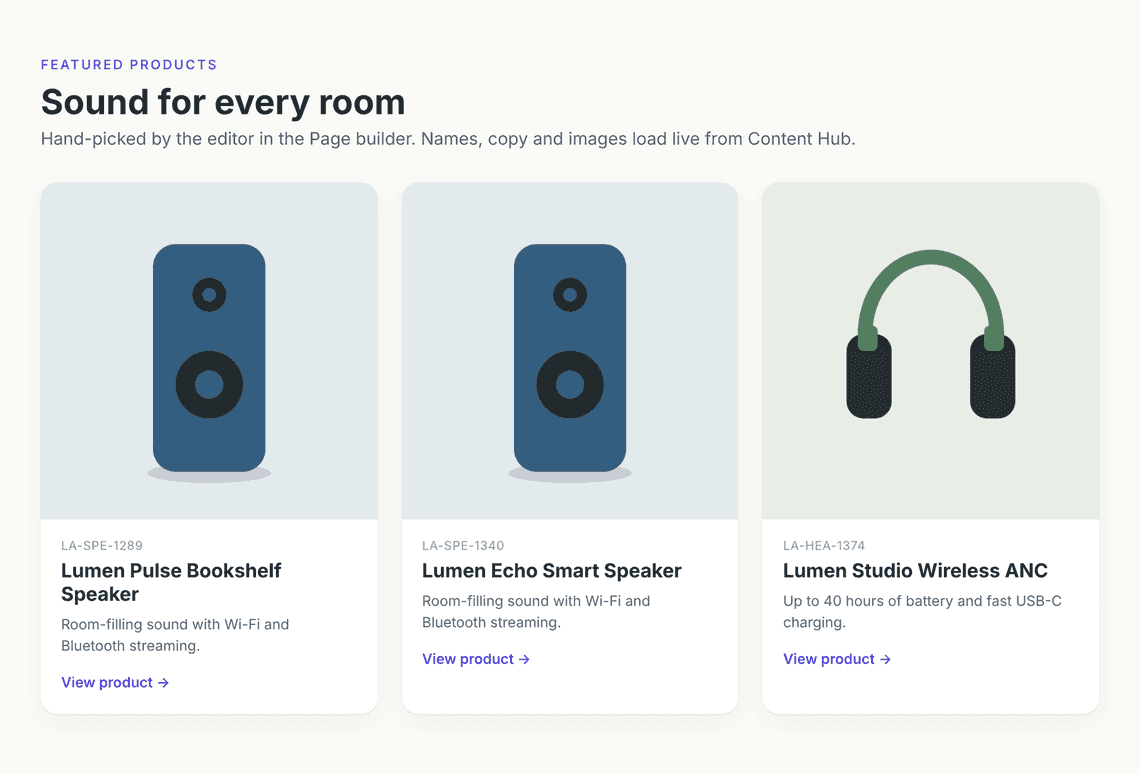
Illustrative rendering built from the demo catalogue to show the end result, not a customer page.
Because the copy and images come from Content Hub at render time, a product re-shot or re-described in the PIM shows up on every page that features it, without anyone editing those pages again.
What worked
- Authors stay in the Page builder. No switching to Content Hub to look up ids.
- One source of truth. The PIM owns product content; SitecoreAI owns which products go where and in what order.
- It isn’t product-specific. The same field picks product families, brands, images, press releases or any custom definition the tenant publishes, so one app serves several components.
- Small, inspectable values. A few ids in JSON are easy to validate, migrate and debug.
The next things I want to add are taxonomy-based filters (asset type, status) alongside the relation filters, and an “open larger” view for image-heavy picking.
Further reading
Sitecore Marketplace
- Page builder custom fields: the extension point this app uses
- Get and set custom field values with the Marketplace SDK
- Enable a custom field in the SitecoreAI Page builder: adding the field to a template
- Register a custom app and configure and activate it in App Studio
- Custom Marketplace apps: roles, and how custom apps differ from public ones
- Marketplace SDK on GitHub and the Marketplace Starter Kit (walkthrough)
Content Hub
- Experience Edge for Content Hub APIs: Preview, Delivery and Token APIs
- Delivery API: endpoint, headers and the GraphQL IDE
- Get started with product content and product families in Content Hub PIM
If you’re building a similar component on SitecoreAI with Content Hub, I hope this saves you the copy-and-sync detour. I’m happy to talk through the details.

Related Posts

Quick Links
Explore topics