


Beyond the Prompt: Building with GenMedia
Sumith Parambat Damodaran
October 23, 2026 5 min
A photo booth is a deceptively good way to learn how to build with generative AI. The interaction sounds simple: bring a photo, choose a scene, and see yourself in another world. Making that experience understandable, connected and teachable takes considerably more thought.
After facilitating and learning at Google Cloud Labs London Formula E, where I completed Building with GenMedia for Developers, I wanted to carry the ideas into something of my own. For AI DevCamp 2026’s Halloween Hackathon, I built The Haunted Kiosk and a companion codelab, Raise Your Own Haunt.
Open the app or follow the 14-step codelab.
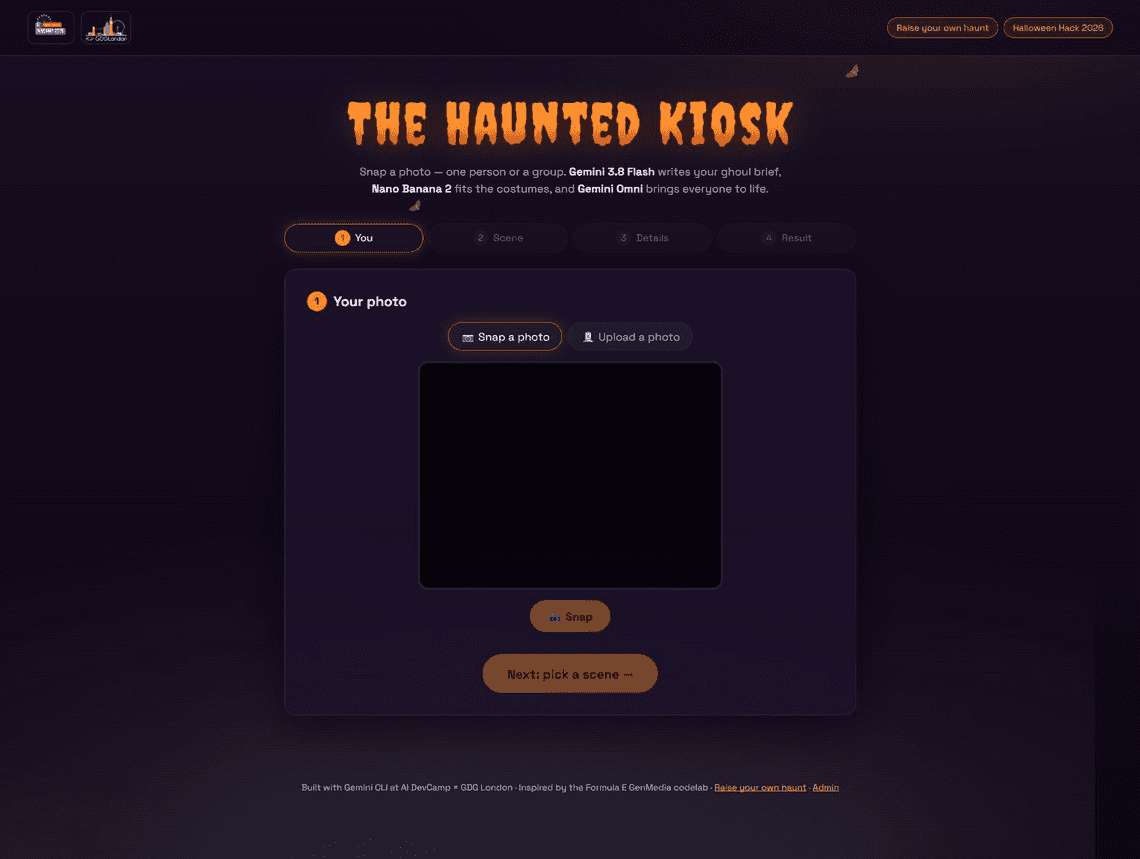
Actual application screenshot captured on 23 October 2026. This shows the input screen, not a generated result; the camera preview was unavailable in the review browser.
The creative goal is a Halloween transformation of one person or a group: a playful name, an edited portrait, and a short animated clip. The important constraint is that the people should remain recognisable. Costumes, props, lighting and surroundings can change; replacing the people defeats the point.
That is a prompt constraint and a review criterion, not a guarantee that a generative model will preserve every face correctly.
The Formula E GenMedia codelab provided the inspiration: connect a photograph, prompt expansion, image editing and asynchronous video generation. My earlier GenMedia event reflection covers that learning experience.
For this project, I adapted the workflow to React, TypeScript and Vite, with Firebase Authentication, Storage and AI Logic, plus Vercel functions for video. The reference lab’s Python/FastAPI and Cloud Run approach is useful context; this implementation uses a different application boundary.
The app credits Gemini CLI as a building tool. The codelab also includes an optional brief for other coding assistants. Using an assistant to write code does not remove the need to understand credentials, test each call, or inspect the generated media.
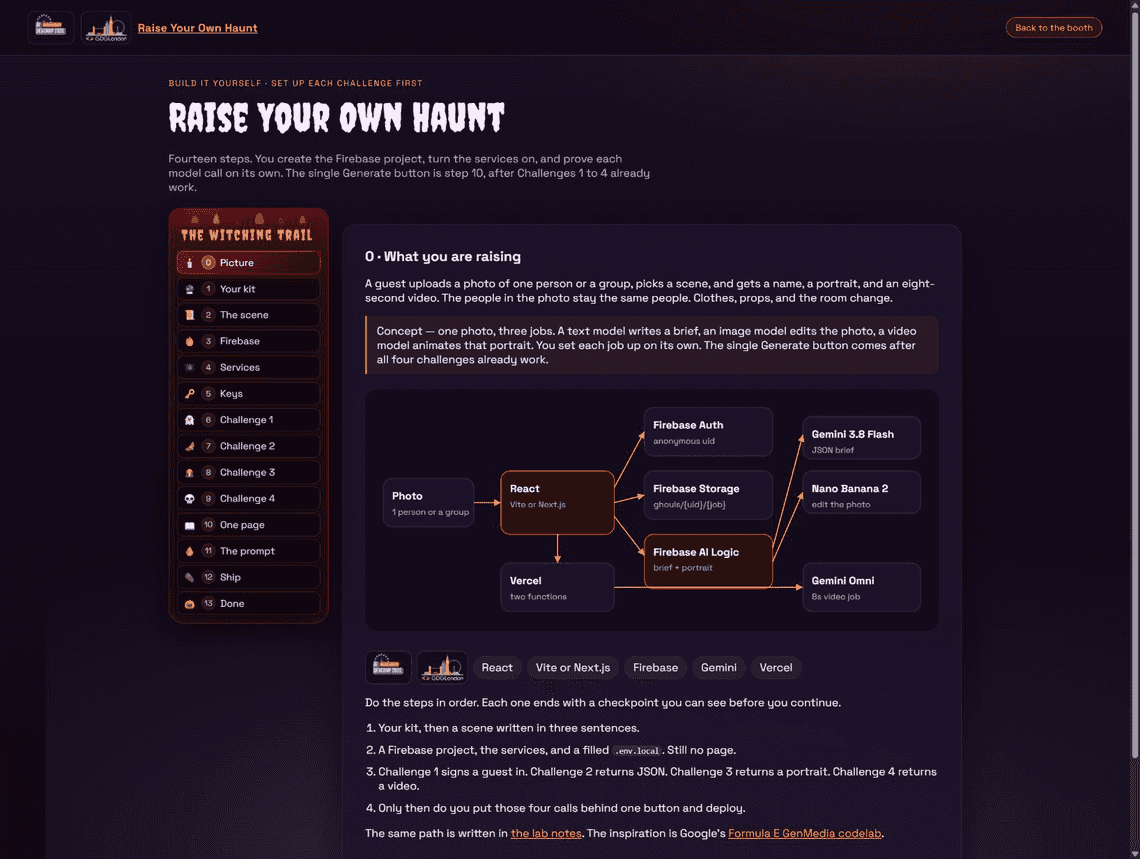
The actual codelab overview. Its diagram explains the intended data flow; it is not a trace of a completed generation run.
The core flow in src/lib/pipeline.ts is:
The browser coordinates these stages and displays progress. Firebase AI Logic provides the client-facing route for the brief and portrait calls. The video path uses the Google GenAI Node SDK on the server, where the Gemini API key and Firebase Admin credentials remain.
Files are organised under ghouls/{uid}/{jobId}/, including selfie.jpg, avatar.png and video.mp4. The user identifier and job identifier give each run a concrete place in the workflow rather than passing around an unrelated collection of assets.
The source defaults name gemini-3.8-flash for prompt expansion, gemini-3.1-flash-image for image editing, and gemini-omni-1.1-flash for server-side video. These are the identifiers recorded in this project’s source and codelab at review time. The prompt and image defaults can be overridden through configuration, as can the server video model. They are not a claim about universal model access or a promise that every deployment uses those defaults.
The codelab is numbered 0 through 13. I deliberately made infrastructure and individual checkpoints part of the lesson, rather than beginning with a large Generate button and trying to debug everything behind it.
Step 0 — Picture sets the destination and shows the architecture. A text model writes a brief, an image model edits the photo, and a video model animates the portrait. The single-button experience comes later.
Step 1 — Your kit covers the accounts and tools: Google/Firebase, AI Studio, Node.js, Git, the Firebase CLI and eventually GitHub and Vercel. It also calls out billing and quota setup. Those are prerequisites to check in the relevant consoles, not something an attractive frontend can fix.
Step 2 — The scene reduces the creative input to three strings: costume, setting and motion. For example, a cape describes clothing; fog around Tower Bridge describes the setting; a slow camera push-in describes motion. Keeping those concerns separate makes it easier to change the scene without accidentally asking for a different face.
Step 3 — Firebase creates the project and registers a web application. The Firebase web configuration identifies the project; it is distinct from the server’s Gemini API key.
Step 4 — Services enables Firebase AI Logic with the Gemini Developer API backend, anonymous authentication and Storage. Anonymous sign-in supplies a uid; the tutorial uses it to explain ownership of uploaded files. It also introduces Storage rules and the server’s separate Admin SDK access.
Step 5 — Keys brings the configuration together in an ignored .env.local file. It separates browser configuration from server secrets and introduces App Check, with local development and deployed-site configuration handled differently. A VITE_ variable is bundled into the frontend, so it is the wrong place for a server Gemini key or service-account credential.
The useful lesson here is the distinction between who the guest is, whether a request comes from an accepted app, and what a storage request may access. Authentication, App Check and Storage rules have different jobs.
Step 6 — Challenge 1 initialises the Firebase client and AI Logic backend, then proves anonymous sign-in. The checkpoint is a visible uid, with no Gemini call yet. That keeps a broken client setup from being confused with a model failure.
Step 7 — Challenge 2 adds the photo-aware brief. In src/lib/promptExpansion.ts, the request combines text with inline image data and asks for JSON using a response schema. The configuration uses temperature 0.2 and high thinking. The output has four string fields: ghoulName, personDescription, avatarPrompt and videoPrompt.
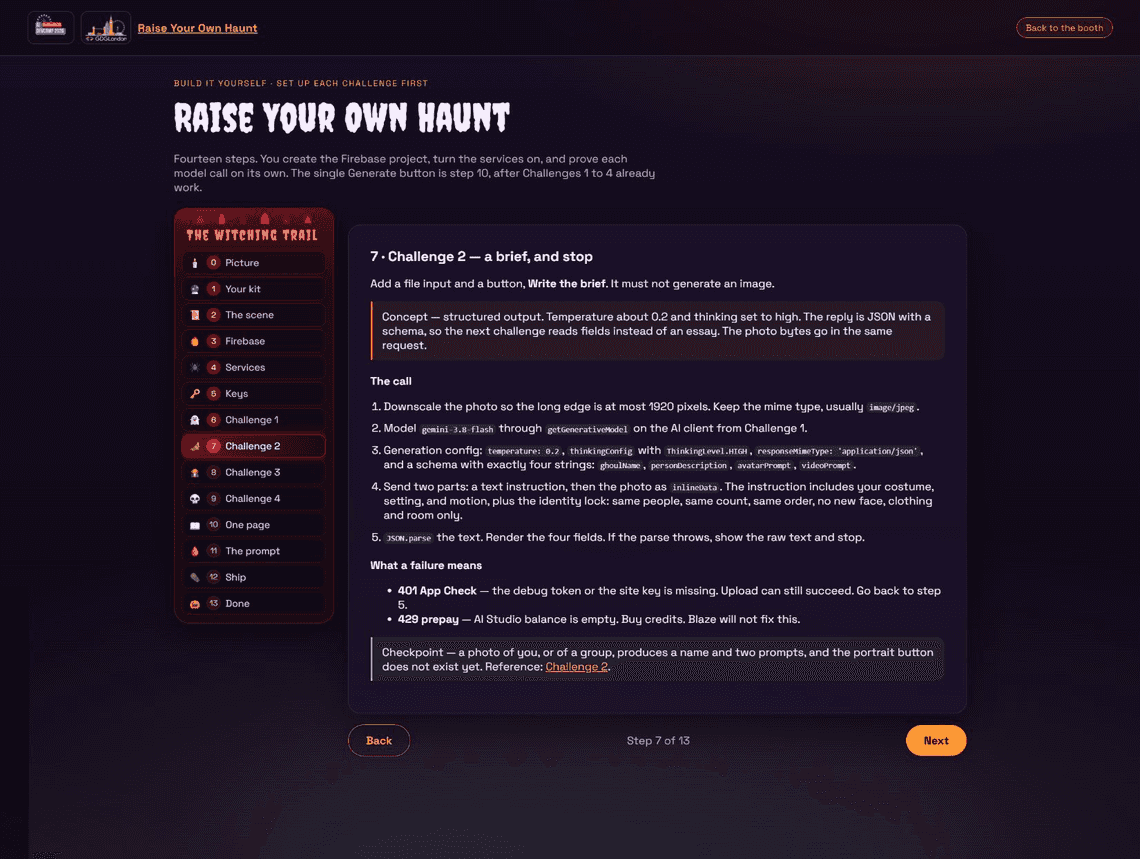
Challenge 2: make the contract visible before connecting the next model.
This is the interface between the stages. The portrait generator consumes avatarPrompt; the video route receives videoPrompt. The implementation parses the returned JSON. A schema makes the output more usable, but it does not prove that the content is creatively right or that every downstream request will succeed.
Step 8 — Challenge 3 edits the photograph. src/lib/avatar.ts sends the original photo bytes again, rather than trying to reconstruct a person from a text description. It requests image output with either 9:16 or 16:9 framing and layers identity-preservation instructions over the generated brief. The learner must inspect faces and count people before moving on.
Step 9 — Challenge 4 treats video as a background job. POST /api/video/start verifies the Firebase user, reads the stored portrait and returns an interaction identifier. GET /api/video/status checks once; when the result is ready, it stores the clip and returns a URL. The browser polls at five-second intervals.
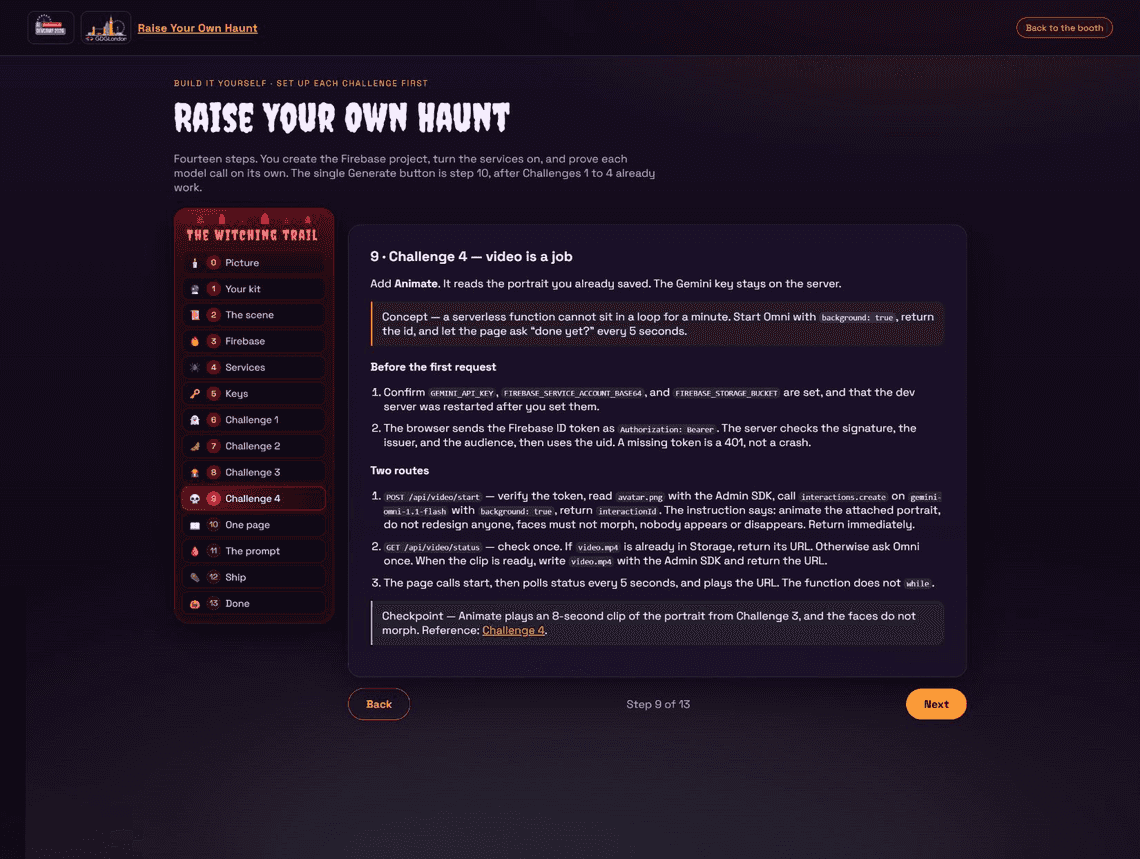
Challenge 4: start, return, check again. The wait belongs in the guest experience, with short server requests.
The server uses background: true. The status route also checks whether the video has already been saved before asking the model service again. This makes repeated status checks useful without repeatedly saving an already completed result.
The codelab targets an eight-second clip. That is the creative target described in the instructions; the reviewed server request sets video format, aspect ratio and 720p resolution without an explicit duration field. I would verify actual output duration rather than infer it from the UI wording.
Step 10 — One page joins the four working challenges behind Generate. It shows the name when the brief arrives, the portrait when it is ready and the video when polling completes. A stage-specific status line makes the waiting and any failure understandable.
Step 11 — The prompt is optional. It gives a coding assistant a bounded implementation brief and tells it to stop at each checkpoint. The learner supplies the scene, chooses a stack and keeps secrets out of the conversation. The best part of this approach is that the assistant’s progress remains testable.
Step 12 — Ship moves from local checks to Vercel, including environment configuration, authorised domains and App Check configuration for the public hostname. It reminds learners that Vite configuration is applied at build time: changing a dashboard value requires a new build to reach the browser.
Step 13 — Done asks the learner to explain the design: a scene is three strings, a brief connects the models, the photo remains part of the requests, and the Gemini server key stays on the server. Being able to explain those boundaries matters as much as reaching the final screen.
The reference booth goes beyond the intentionally small learner app. Its source includes a scene picker, caption generation running alongside media work, branded image and video handling, token-usage reporting, pickup links/QR components, sharing and printing helpers, and an admin interface. Step 10 explicitly leaves those extras outside the minimal exercise.
Those are implemented code paths, not evidence that every feature has passed a live acceptance test. For this article, the app and all fourteen codelab steps were inspected in the browser and the relevant implementation files were reviewed. The screenshots show real UI. This review did not run a new photo-to-video generation or validate the deployment’s quotas, output quality or every reference-booth feature.
There is also a distinction between instructional checkpoints and enforced product behaviour. The codelab asks a person to inspect the portrait before animation; the combined pipeline proceeds automatically after image generation. A separate approval gate would be future work. Likewise, stronger runtime validation of the brief, measured identity-consistency checks, and a documented retention policy are improvements I would explore, not completed capabilities I am claiming here.
This project has explicit application orchestration: the browser calls a defined sequence of services. The reviewed dependency list and core implementation do not use Google’s Agent Development Kit. I am not presenting it as an ADK agent.
ADK remains a possible later experiment if I need more elaborate coordination or review. For this booth, I learned a great deal by making the data flow and failure boundaries visible directly in the application.
My biggest takeaway is that a compelling GenMedia demo is also a systems lesson. Structured output connects stages. Original image input gives an edit its grounding. Background jobs change how progress is presented. Credentials, configuration and deployment domains determine whether a beautifully styled page can actually call its services.
The Halloween theme made those lessons fun to build and share. Turning the implementation into fourteen small steps made them easier to explain. That is the progression I wanted from the Formula E learning experience: build something personal, make the boundaries understandable, and give the next developer a path they can follow.
src/lib/pipeline.ts, promptExpansion.ts, avatar.ts, models.ts, server/omni.ts and the video API routes. Model identifiers and implementation details above describe the reviewed project version.Screenshots are direct captures of my deployed app and codelab, not generated illustrations or sample media outputs. Event participation and project authorship are my own account.

Quick Links
Explore topics